Showing posts with label Design Patterns. Show all posts

Friday, December 23, 2011

The Iterator Pattern

It doesn't take long in one's c# education before one discovers the 'foreach' loop. What they may not know is that this is actually the Iterator pattern built into the language through the IEnumerator and IEnumerable interfaces.
In this article I'll go over the pattern and show you how to build an iterator from scratch. While you may never implement this exact pattern in any of your projects it's good to know how it's done and will hopefully help you understand how to extend the built-in iteration system within the c# language.
Ignoring our 'foreach' capabilities for the moment let's see what the problem is.
//Here's a simple class that can be kept in
//some sort of collection.  We don't know what kind of
//collection but we'd like to go through each Item and 
//print out the description.
class Item
{
    string _description;

    public string Description
    {
        get { return _description; }
    }

    public Item(string description)
    {
        _description = description;
    }
}

class Program
{
    static void Main(string[] args)
    {
        List<Item> itemList = new List<Item>();
        
        int maxArraySize = 3;
        Item[] itemArray = new Item[3];
        
        //populate the collections.
        for (int i = 0; i < maxArraySize; i++)
        {
            Item ithItem = new Item("Item" + i.ToString());

            itemArray[i] = ithItem;
            itemList.Add(ithItem);
        }
        
        //Iterate over the List...
        for (int i = 0; i < itemList.Count; i++)
        {
            Console.WriteLine(itemList[i].Description);
        }
        
        //Iterate over the Array...
        for (int = 0; i < itemArray.Length; i++)
        {
            Console.WriteLine(itemArray[i].Description);
        }
    }
}

Again, temporarily forgetting about the 'foreach' loop (we'll get to it), this is a mess with no obvious solution. For every type of collection we have we'd need to loop over it in a different way. The List has a Length property while arrays have a Count property and there's no telling how some other collection may be looped through.
Let's make a simple Store interface to help illustrate. Some stores may want use Arrays, and some may want to use Lists or any other type of collection at all, but they all need to be able to print out the description of their inventory. A Store can be thought of here as an Item collection.
interface IStore
{
    void PrintInventory();
}

public class ListStore : IStore
{
    List<Item> _inventory;

    public ListStore()
    {
        _inventory.Add(new Item("Soap"));
        _inventory.Add(new Item("Fan"));
        _inventory.Add(new Item("Fish Tank"));
    }

    public void PrintInventory()
    {
        //Here's the problem...
        for (int i = 0; i = _inventory.Count; i++)
        {
            Console.WriteLine(_inventory[i].Description);
        }
    }
}

public class ArrayStore : IStore
{
    const int maxSize = 3;
    Item[] _inventory;

    public ListStore()
    {
        _inventory = new Item[maxSize];

        _inventory[0] = new Item("Shoes");
        _inventory[1] = new Item("Duct Tape");
        _inventory[2] = new Item("Venti Cappuccino");
    }

    public void PrintInventory()
    {
        //Here's the problem...
        //Duplicating code at all or with slight differences
        //should make your refactoring senses tingle!
        for (int i = 0; i = itemList.Count; i++)
        {
            Console.WriteLine(itemList[i].Description);
        }

    }
}
What's changing here is the particulars of the iteration. We'd like to encapsulate iteration and the Iterator pattern does just that by introducing an Iterator interface that will allow us to control how we loop through any collection in any way we want.
It's not too tricky so let's take a look.
interface IIterator
{
    //This will tell us if there is a
    //next element in a collection...
    bool HasNext();

    //And this will return the next element.
    object Next();
}

//Let's see how these iterators are implemented.
//first for a List...
class ListIterator : IIterator
{
    List<Item> _items;

    //_position keeps track of where we
    //are in the iteration of the list.
    int _position = 0;

    public ListIterator(List<Item> items)
    {
        _items = items;
    }

    public object Next()
    {
        Item item = _items[_position];
        _position++;
        return item;
    }

    public bool HasNext()
    {
        if (_position >= items.Count)
        {
            return false;
        }
        else
        {
            return true;
        }
    }
}

//And now for the array...
class ArrayIterator : IIterator
{
    Item[] _items;
    int _position = 0;

    public ListIterator(Item[] items)
    {
        _items = items;
    }

    public object Next()
    {
        Item item = _items[_position];

        //Increment our position...
        _position++;
        return item;
    }

    public bool HasNext()
    {
        if (_position >= items.Length)
        {
            return false;
        }
        else
        {
            return true;
        }
    }
}
Now we need to make some small changes to the Store interface...
interface IStore
{
    //All we need is a method to retrieve
    //the appropriate iterator.
    IIterator GetIterator();
}

public class ListStore : IStore
{
    List<Item> _inventory;

    public ListStore()
    {
        _inventory.Add(new Item("Soap"));
        _inventory.Add(new Item("Fan"));
        _inventory.Add(new Item("Fish Tank"));
    }

    public void GetIterator()
    {
        //this iterator is passed a list item
        //to loop through.
        return new ListIterator(_list);
    }
}

public class ArrayStore : IStore
{
    const int maxSize = 3;
    Item[] _inventory;

    public ListStore()
    {
        _inventory = new Item[maxSize];

        _inventory[0] = new Item("Shoes");
        _inventory[1] = new Item("Duct Tape");
        _inventory[2] = new Item("Venti Cappuccino");
    }

    public void GetIterator()
    {
        return new ArrayIterator(_inventory);
    }
}
Now we can loop through each element in a collection regardless of the type, as long as the class associated with the collection returns the correct Iterator type.
Let's see this in action.
class Program
{
    static void Main(string[] args)
    {
        IStore listStore = new ListStore();
        IStore arrayStore = new ArrayStore();
        
        IIterator listStoreIterator = listStore.GetIterator();
        IIterator arrayStoreIterator = arrayStore.GetIterator();
        
        //Now it doesn't matter what type of
        //collection our stores use in their implementation
        //as long as they know their iterator!   
        PrintInventory(listStoreIterator);
        PrintInventory(arrayStoreIterator);
    }

    //we could have also kept this in the store class and
    //done the iteration internally.
    void PrintInventory(IIterator iterator)
    {
        while (iterator.HasNext())
        {
            Item storeItem = (Item)iterator.Next();
            Console.WriteLine(storeItem.Description);
        }
    }
}
This is, as I may have mentioned before, a very simplified example with a simple version of the pattern and is not the only way to implement this or any pattern. Just for one example we could have used generics in the iterator's Next() method to return an exact type instead of an object type.
We could iterate through a collection in any way as well: backwards, skipping every other one or anything, really.
This is basically what c# uses when you use a foreach loop, except they use an IEnumerator interface instead of our Iterator and the IEnumerable interface for returning the appropriate iterator or enumerator, ie. the GetIterator() method in our IStore interface. The actual 'foreach' keyword is syntactic sugar for making the code easier to read or write but is basically using something like our while loop.
In actual c# programming you'll never actually need to make an iterator from scratch since there's such a nice one built in with such simple syntax, but I thought it might be illuminating to see how it's actually done.
Because this is an article about design patterns and not about all the neat features of c# I won't go into how to extend IEnumerable or IEnumerator here but here are some links for doing just that.

Further reading:

MSDN.com
codebetter.com
this article shows us how to code the same behavior without using a seperate iterator interface, the iteration is done in the collection class using the yield keyword.

Tuesday, December 13, 2011

The Composite Pattern

The Composite pattern defines a tree structure. A tree structure is a hierarchical composition of nodes, kind of a nested collection; a node can be composed of other nodes or not. Nodes that contain other nodes are called parent-nodes while the nodes they contain are not surprisingly called child-nodes. Some nodes are not or cannot be a parent to other nodes. These are called leaf-nodes. One benefit of the Composite pattern is that we can treat the entire tree, a branch (or sub-tree), or a single node equally since they're all the same data type, ie. nodes.
Graphically, the structure resembles a tree hence the name.


An obvious example would the be folders or directories on your hard drive, which can contain other folders, which can contain others and so on. Files would be our leaf-nodes since they cannot contain further folders. While searching for a file, your computer visits each folder and each file within each folder in a certain order until the desired file is found. The process of visiting each node is called tree traversal.
There are many uses for tree structures ranging from collision detection to list sorting algorithms.
In this article we will use the Composite pattern to set up a tree structure and learn how to traverse it in different ways.
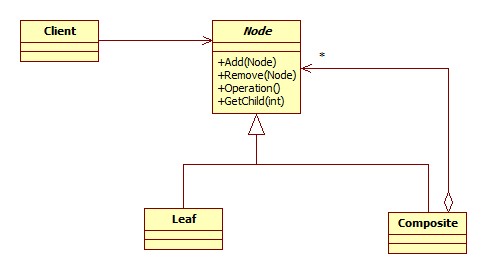
Let's take a quick look at the class diagram.

As you can see, the Node which defines the interface that our client class will be working with contains methods for adding, removing and retrieving nodes. A leaf-node cannot contain other nodes but must still inherit from the Node interface so these methods are superfluous, moreover, there may be methods or properties that apply only to a leaf node and not a component node. While this does break the "one class, one responsibility" paradigm, we get the benefit of being able to treat every part of the tree the same: as a Node. This can make for somewhat dangerous code if the client tries accessing something that does not apply to the object but there are ways to handle it and the ability to treat each part of the tree uniformly can be worth the added overhead.
For our example we'll build a mock folder tree with "folders" and "files". The folders will have a name and be able to contain either other folders or files. The files will have a name and a "description" string field but will be unable to contain other nodes. Likewise, our folders will have no description field.
//The interface all nodes will implement.
interface IDirectoryNode
{
    string Name { get; }
    string Description { get; set; }
    void AddNode(IDirectoryNode node);
    void RemoveNode(IDirectoryNode node);
    IDirectoryNode[] GetNodes();
}

//Our Composite node class.
class Folder : IDirectoryNode
{
    string _name;
    List<IDirectoryNode> _nodes = new List<IDirectoryNode>();

    string Name
    {
        get { return _name; }
    }

    string Description
    {
        //This is one way of handling this.
        //we return a null description and the
        //setter does nothing.  We could have
        //thrown an exception among other solutions.
        get { return null; }
        set { }
    }

    public Folder(string name)
    {
        _name = name;
    }

    public void AddNode(IDirectoryNode node)
    {
        _nodes.Add(node);
    }

    public void RemoveNode(IDirectoryNode node)
    {
        _nodes.Remove(node);
    }

    public IDirectoryNode[] GetNodes()
    {
        return _nodes.ToArray();
    }
}

//Now for the leaf nodes.
class File : IDirectoryNode
{
    string _name;
    string _description;

    string Name
    {
        get { return _name; }
    }

    string Description
    {
        get { return _description; }
        set { _description = value; }
    }

    public File(string name, string description)
    {
        _name = name;
        _description = description;
    }

    //These do nothing.
    public void AddNode(IDirectoryNode node) { }
    public void RemoveNode(IDirectoryNode node) { }

    public IDirectoryNode[] GetNodes()
    {
        return null;
    }
}
This is good is the sense that we can create Folders and Files and build our tree but there's not much we can do with it from there. We need a ways to traverse the tree. There are two ways to do this: with a depth-first search where we start at a node and visit all of its children before backtracking or a breadth-first search where we visit all the nodes on the same level before exploring their children.
We will implement both as a way to search for names and descriptions.
First we'll make methods that perform a depth-first search and return a list of nodes that match what we're looking for. We'll be using recursion in this example but there are iterative ways to do it as well. Let's add these new search methods to our interface and classes.
interface IDirectoryNode
{
    string Name { get; }
    string Description { get; set; }
    void AddNode(IDirectoryNode node);
    void RemoveNode(IDirectoryNode node);
    IDirectoryNode[] GetNodes();
    List<IDirectoryNode> SearchForNames(string name);
    List<IDirectoryNode> SearchForDescriptions(string descriptions);
}

class Folder : IDirectoryNode
{
    string _name;
    List&lt;IDirectoryNode&gt; _nodes = new List&lt;IDirectoryNode&gt;();

    string Name
    {
        get { return _name; }
    }

    string Description
    {
        get { return null; }
        set { }
    }

    public Folder(string name)
    {
        _name = name;
    }

    public void AddNode(IDirectoryNode node)
    {
        _nodes.Add(node);
    }

    public void RemoveNode(IDirectoryNode node)
    {
        _nodes.Remove(node);
    }

    public IDirectoryNode[] GetNodes()
    {
        return _nodes.ToArray();
    }

    public List<IDirectoryNode> SearchForNames(string name)
    {
        List<IDirectoryNode> results = new List<IDirectoryNode>();
        foreach (IDirectoryNode node in _nodes)
        {
            string nodeName = node.Name;

            //Some debugging to make sure we're traversing
            //the tree in the correct order.
            Console.WriteLine(
                "Visiting " + nodeName + " " + "the " + node.ToString());

            if (nodeName == name)
            {
                results.Add(node);
            }

            //Here is where we recurse down into the tree.
            results.AddRange(node.SearchForNames(name));
        }
        return results;
    }

    public List<IDirectoryNode> SearchForDescriptions(string description)
    {
        List<IDirectoryNode> results = new List<IDirectoryNode>();

        foreach (IDirectoryNode node in _nodes)
        {
            string nodeDescription = node.Description;

            //Some debugging to make sure we're traversing
            //the tree in the correct order.
            Console.WriteLine(
                "Visiting " + node.Name + " " + "the " + node.ToString());

            if (nodeDescription != null &&
                nodeDescription == description)
            {
                results.Add(node);
            }

            results.AddRange(node.SearchForDescriptions(description));
        }

        return results;
    }
}

class File : IDirectoryNode
{
    string _name;
    string _description;

    string Name
    {
        get { return _name; }
    }

    string Description
    {
        get { return _description; }
        set { _description = value; }
    }

    public File(string name, string description)
    {
        _name = name;
        _description = description;
    }

    //These do nothing.
    public void AddNode(IDirectoryNode node) { }
    public void RemoveNode(IDirectoryNode node) { }

    public IDirectoryNode[] GetNodes()
    {
        return null;
    }

    //These are not applicable so we just
    //return an empty list.
    public List<IDirectoryNode> SearchForNames(string name)
    {
        return new List<IDirectoryNode>();
    }

    public List<IDirectoryNode> SearchForDescriptions(string description)
    {
        return new List<IDirectoryNode>();
    }
}
Let's test this out by building a tree and searching for some things.
class Program
{
    static void Main(string[] args)
    {
        //Building our tree...
        IDirectoryNode documentsFolder = new Folder("Documents");
        IDirectoryNode gamesFolder = new Folder("Games");
        IDirectoryNode musicFolder = new Folder("Music");
        IDirectoryNode someGame = new File("Fun Time Game", "Whooo, fun!");
        IDirectoryNode someSong = new File("Happy Song", "La la la");
        IDirectoryNode textDocument = new File("Journal", "I had a good day!");
        IDirectoryNode textDocumentTwo = new File("Journal", "I had a bad day!");

        documentsFolder.AddNode(gamesFolder);
        documentsFolder.AddNode(musicFolder);
        documentsFolder.AddNode(textDocument);
        gamesFolder.AddNode(someGame);
        musicFolder.AddNode(someSong);
        musicFolder.AddNode(textDocumentTwo);

        //Now we can do searches.
        List<idirectorynode> nameResults = new List<idirectorynode>();
        nameResults = 
            documentsFolder.SearchForNames("Journal");

        foreach (IDirectoryNode node in nameResults)
        {
            Console.WriteLine(node.Name);
        }

        Console.WriteLine();

        List<idirectorynode> descriptionResults = 
            documentsFolder.SearchForDescriptions("La la la");

        foreach (IDirectoryNode node in descriptionResults)
        {
           Console.WriteLine(node.Name);
        }

        Console.ReadLine();
   }
}
As you can see, each child is being completely explored before moving on to the next.
Now let's try to make the breadth-depth search.
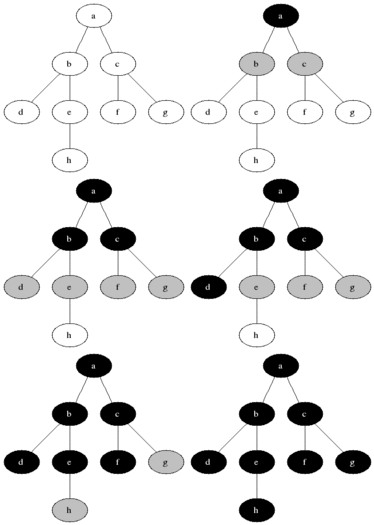
We'll be using a queue to keep track of the nodes we still need to explore. Once a node in the queue has been explored, it's removed from line and its children are added. This is repeated until the queue is empty.
This image from wikipedia illustrates the algorithm beautifully.


The grey nodes are the ones currently enqueued and the black nodes are the ones being visited.
For the sake of brevity I will write out just search methods. The interface needs the new stubs as well.
//The breadth-first Folder search implementation.
public List<IDirectoryNode> BreadthFirstNameSearch(string name)
{
    List<IDirectoryNode> result = new List<IDirectoryNode>();
    Queue<IDirectoryNode> searchQueue = new Queue<IDirectoryNode>();

    foreach (IDirectoryNode node in _nodes)
    {
        searchQueue.Enqueue(node);
    }

    while (searchQueue.Count != 0)
    {
        IDirectoryNode currentNode = searchQueue.Dequeue();

        Console.WriteLine(
            "Examining " + currentNode.ToString() + ", " + currentNode.Name);

        if (currentNode.Name == name)
        {
            result.Add(currentNode);                   
        }
        foreach (IDirectoryNode node in currentNode.GetNodes())
        {
            searchQueue.Enqueue(node);
        }
    }

    return result;
}

public List<IDirectoryNode> BreadthFirstDescriptionSearch(string description)
{
    List<IDirectoryNode> result = new List<IDirectoryNode>();
    Queue<IDirectoryNode> searchQueue = new Queue<IDirectoryNode>();

    foreach (IDirectoryNode node in _nodes)
    {
        searchQueue.Enqueue(node);
    }

    while (searchQueue.Count != 0)
    {
        IDirectoryNode currentNode = searchQueue.Dequeue();

        Console.WriteLine(
            "Examining " + currentNode.ToString() + ", " + currentNode.Name);


        if (currentNode.Description != null &&
            currentNode.Description == description)
        {
            result.Add(currentNode);                   
        }

        foreach (IDirectoryNode node in currentNode.GetNodes())
        {
            searchQueue.Enqueue(node);
        }
    }

    return result;
}
Since we cannot search files their implementations simply return empty lists.
If we had used a stack instead of a queue this would have resulting in a depth-first search. Testing this out:
class Program
{
    static void Main(string[] args)
    {
        IDirectoryNode documentsFolder = new Folder("Documents");
        IDirectoryNode gamesFolder = new Folder("Games");
        IDirectoryNode musicFolder = new Folder("Music");
        IDirectoryNode someGame = new File("Fun Time Game", "Whooo, fun!");
        IDirectoryNode someSong = new File("Happy Song", "La la la");
        IDirectoryNode textDocument = new File("Journal", "I had a good day!");
        IDirectoryNode textDocumentTwo = new File("Journal", "I had a bad day!");

        documentsFolder.AddNode(gamesFolder);
        documentsFolder.AddNode(musicFolder);
        documentsFolder.AddNode(textDocument);
        gamesFolder.AddNode(someGame);
        musicFolder.AddNode(someSong);
        musicFolder.AddNode(textDocumentTwo);

        List<IDirectoryNode> nameResults = new List<IDirectoryNode>();
        nameResults = 
            documentsFolder.BreadthFirstNameSearch("Journal");

        foreach (IDirectoryNode node in nameResults)
        {
            Console.WriteLine(node.Name);
        }

        Console.WriteLine();

        List<IDirectoryNode> descriptionResults = 
            documentsFolder.BreadthFirstDescriptionSearch("La la la");

        foreach (IDirectoryNode node in descriptionResults)
        {
            Console.WriteLine(node.Name);
        }

        Console.ReadLine();
    }
}


Notice the different order in which each node is visited.
This is just one very simple way to do this, there are more sophisticated and generalized ways of going about this but the algorithms themselves are the same or very similar.

And this concludes my Design Pattern series (for now)! Next I'll start focusing more on collision algorithms and game physics.
I hope you've enjoyed reading them as much as I have writing them!
Feel free to leave comments, questions, corrections or what have you. Thanks!

The Command Pattern

The Command pattern is way to separate a request for an action to be performed from the object that actually performs the action. It encapsulates method invocation allowing one to parameterize or change the object making the invocation on the fly.
It's also really neat.
First let's look at a very simple situation where we may need something like this.
Let's say we have two types of objects, a glass bottle and I don't know, a wooden box. If we drop the glass bottle it shatters instantly and is gone. The box however can be dropped a few times before breaking.
Let's see how two simple versions of these classes may be set up.
class Bottle
{
    bool _broken = false;

    public void Break()
    {
        if (_broken)
        {
            Console.WriteLine("The bottle is already broken");
        }
        else
        {
            _broken = true;
            Console.WriteLine("The bottle shatters");
        }
    }
}

class Box
{
    bool _broken = false;
    int _hitPoints = 3;

    public void Hit()
    {
        if (_broken)
        {
            Console.WriteLine("The box is broken irreparably.")
        }
        else
        {
            _hitPoints--;
            if (_hitPoints <= 0)
            {
                _broken = true;
                Console.WriteLine("The box breaks.")
            }
        }
    }
}

The methods Hit() and Break() are clearly fairly different from one another other besides the fact that they are both void and parameterless and they are both probably going to called during very similar situations.
So how would a client class have to deal with this? We can set up a very simple situation to demonstrate the problems that arise.
class Program
{        
    static void Main(string[] args)
    {
        Bottle bottle = new Bottle();
        Box box = new Box();
        string input = "";

        while (input.ToLower() != "q")
        {
            Console.WriteLine(
                "Press B to drop the (B)ottle, O to drop the B(o)x or Q to (Q)uit.");
            input = Console.ReadLine();

            if (input.ToLower() == "b")
            {
                bottle.Break();
            }
            else if (input.ToLower() == "o")
            {
                box.Drop();
            }               
        }
    }
}

It works now but this clearly will not do.
The above code is pretty bad on a number of levels. For starters the more objects added that can be dropped, the bulkier and just awful our client class becomes.
Secondly the client class (in this over simplified case it's the Program class) has too many responsibilities: accepting and interpreting user input and responding to the input (that problem specifically I'm not actually going over in this article but it's something to think about). A general design guideline is: one class, one responsibility. Moreover, in some cases our client class may not even have access to Bottles and Boxes as they may be hidden.
The Command pattern helps by introducing a new type of object called a command object which will contain a single method, Execute().
It's not an easy pattern to grasp at first (it wasn't for me anyway) but it's usefulness became apparent once I did.
Before we dive into the code, let's look at a real world analogy that mirrors how the command pattern works.
In a cafe we can can order many different types of beverages and each have a different procedure for making it. We give our drink order to the chashier who writes down the specifics of the drink we want. The slip encapsulates our drink order. It is then passed off to the barrista who interprets what's written on the slip and makes your drink.
You, the customer, know how to order a drink so you create a command (your order) and pass it off to the chashier. The chashier in turn takes the command you created and passes it to the barrista who makes the drink. Most real life cafe cashiers, of course, must also need to know how to prepare a drink, but for our purposes they do not and have completely separate responsibilities.
Now let's look at the various pieces of the pattern and see how they fit into the cafe scenario.
The Command pattern has a client class which is responsible for creating our command objects (the customer), the client then passes the command to the invoker. The invoker contains one or more references to a command objects which the client sets. Now the invoker can invoke one of these commands at any time, which is like having the barrista make the drinks. Since the invoker can call these methods at any time, we can even set up ques of commands to be executed in a certain order.
Moving back to our Box/Bottle issue, let's take a look at some code now to hopefully help gel the whole idea.
Starting with our command interface and objects:
interface ICommand
{
    void Execute();
}

class BottleDropCommand : ICommand
{
    Bottle _bottle;

    public BottleDropCommand(Bottle bottle)
    {
        _bottle = bottle;
    }

    public void Execute()
    {
        _bottle.Break();
    }
}

class BoxDropCommand : ICommand
{
    Box _box;

    public BoxDropCommand(Box box)
    {
        _box = box;
    }

    public void Execute()
    {
        _box.Drop();
    }
}

Now we need our invoker, a sort of item dropping interface to work with. This will hold two ICommand objects that we can execute at any time.
class SimpleItemDropper
{
    //We have two ICommand's at the moment but this can be extended
    //deal with any amount.
    ICommand _commandOne;
    ICommand _commandTwo

    public void SetCommandOne(ICommand command)
    {
        _commandOne = command;
    }

    public void SetCommandTwo(ICommand command)
    {
        _commandTwo = cammand;
    }
    
    //The item dropper doesn't care if it's a box or a bottle, it just
    //executes the set command!
    public void ExecuteOne()
    {
        _commandOne.Execute();
    }

    public void ExecuteTwo()
    {
        _commandTwo.Execute();
    }
}

Now our client class becomes:
class Program
{        
    static void Main(string[] args)
    {
        Bottle bottle = new Bottle();
        Box box = new Box();
        SimpleItemDropper itemDropper = new SimpleItemDropper();

        ICommand dropBottle = new BottleDropCommand(bottle);
        ICommand dropBox = new BoxDropCommand(box);

        itemDropper.SetCommandOne(dropBottle);
        itemDropper.SetCommandTwo(dropBox);

        itemDropper.ExecuteOne();
        itemDropper.ExecuteOne();
        itemDropper.ExecuteTwo();
        itemDropper.ExecuteTwo();
        itemDropper.ExecuteTwo();
        itemDropper.ExecuteTwo();
        itemDropper.ExecuteTwo();
        
        Console.ReadLine();
    }
}
Our output should look something like this:

And that's the Command pattern, a great way to
* encapsulate method invocation
* separate the invocation of a method from the object receiving the invocation request.

There are many more great uses of this pattern as it can do some very clever things. I suggest investigating further and more importantly experimenting with the pattern yourself. This is a very simple (and useless) example and the pattern can be tweaked and extended to your needs (just like any pattern!) but I've successfully conveyed how powerful this pattern is.
Thanks for reading!

Friday, December 9, 2011

The Facade Pattern

The Facade pattern is an incredibly simple pattern. In fact, there's a good chance you've implemented it in your projects before without being aware that you were using a design pattern.
This is a short and simple article, but it is a very useful pattern. The Facade pattern simplifies an interface.
A system can be made up of many classes, with complicated interdependencies, each with their own unique interface.
The Facade pattern is a way to simplify how the client interacts with these objects.
Let's say we have a bunch a classes that control various appliances in the house.
class KitchenLight
{
    public void On()
    {
        Console.WriteLine("Kitchen light on.");
    }
    
    public void Off()
    {
        Console.WriteLine("Kitchen light off.");
    }
}

class LivingRoomLight
{
    public void On()
    {
        Console.WriteLine("Living room light on.");
    }

    public void Off()
    {
        Console.WriteLine("Living room light off.");
    }
}

class TV
{
    int _channel;

    public int Channel
    {
        get { return _channel; }
    }

    public void On()
    {
        Console.WriteLine("TV on.");
    }

    public void Off()
    {
        Console.WriteLine("TV off.");
    }

    public void ChangeChannel(int channel)
    {
        _channel = channel;
    }
}

class DVD
{
    string _name;
    
    public string Name
    {
        get { return _name; }
    }

    public DVD(string name)
    {
        _name = name;
    }
}

class DVDPlayer
{
    TV _tv;
    DVD _dvd;

    public DVDPlayer(TV tv)
    {
        _tv = tv;
    }

    public void On()
    {
        Console.WriteLine("DVD on.");
    }

    public void Off()
    {
        Console.WriteLine("DVD off.");
    }

    public void PlayMovie()
    {
        if (_tv.Channel == 4)
        {
            if (_dvd != null)
            {
                Console.WriteLine("Playing " + _dvd.Name);
            }
            else
            {
                Console.WriteLine("No disc in player.");
            }
        }
        else
        {
            Console.WriteLine("TV must be on channel 4.");
        }
    }

    public void InsertDVD(DVD dvd)
    {
        Console.WriteLine("Inserting " + _dvd.Name);
        _dvd = dvd;
    }    
}
Seems simple but now what if we want to watch a movie? From our client class we'd have to....
class Program
{
    static void Main(string[] args)
    {
        KitchenLight kitchenLight = new KitchenLight();
        LivingRoomLight livingRoomLight = new LivingRoomLight();
        TV tv = new TV();
        DVDPlayer dvdPlayer = new DVDPlayer(tv);
        DVD dvd = new DVD("Memento");

        //We'd have to do all this!
        kitchenLight.Off();
        tv.On();
        tv.ChangeChannel(4);
        dvdPlayer.On();
        dvdPlayer.InsertDVD(dvd);
        livingRoomLight.Off();
        dvdPlayer.PlayMovie();
    }
}
That's a lot just to watch a dvd. And when we're done, we'll have to do the whole thing again in reverse.
And, oh no! We just got an XBox and a new game!
class XBoxGame
{
    string _name;

    public string Name
    {
        get { return _name; }
    }

    public XBoxGame(string name)
    {
        _name = name;
    }
}

class XBox
{
    TV _tv;
    XBoxGame _game;

    public DVDPlayer(TV tv)
    {
        _tv = tv;
    }

    public void On()
    {
        Console.WriteLine("XBox on.");
    }

    public void Off()
    {
        Console.WriteLine("XBox off.");
    }

    public void PlayGame()
    {
        if (_tv.Channel == 4)
        {
            if (_game != null)
            {
                Console.WriteLine("Playing " + _game.Name);
            }
            else
            {
                Console.WriteLine("No game in console.");
            }
        }
        else
        {
            Console.WriteLine("TV must be on channel 4.");
        }
    }

    public void InsertGame(XBoxGame game)
    {
        Console.WriteLine("Inserting " + _game.Name);
        _game = game;
    }    
}
This is getting ridiculous.
Luckily the facade pattern can help. A facade is basically a class that holds all these interconnected classes and knows how to interact with them.
Let's see how.
class HomeApplianceFacade
{
    TV _tv;
    DVDPlayer _dvdPlayer;
    KitchenLight _kitchenLight;
    LivingRoomLight _livingRoomLight;
    XBox _xbox;

    public HomeApplianceFacade(
        TV tv,
        DVDPlayer dvdPlayer,
        KitchenLight kitchenLight,
        LivingRoomLight livingRoomLight,
        XBox xbox)
    {
        _tv = tv;
        _dvdPlayer = dvdPlayer;
        _kitchenLight = kitchenLight;
        _livingRoomLight = livingRoomLight;
        _xbox = xbox;
    }

    public void WatchMovie(DVD dvd)
    {
        kitchenLight.Off();
        tv.On();
        tv.ChangeChannel(4);
        dvdPlayer.On();
        dvdPlayer.InsertDVD(dvd);
        livingRoomLight.Off();
        dvdPlayer.PlayMovie();
    }

    public void FinishedMovie()
    {
        _livingRoomLight.On();
        _dvdPlayer.Off();
        _tv.Off();
        _kitchenLight.On();
    }

    public void PlayGame(XBoxGame game)
    {
        _kitchenLight.Off();
        _tv.On();
        _tv.ChangeChannel(4);
        _xBox.On();
        _xBox.InsertGame(game);
        _livingRoomLight.Off();
        _xBox.PlayGame();
    }

    public void FinishedPlayingGame()
    {
        _livingRoomLight.On();
        _xBox.Off();
        _tv.Off();
        _kitchenLight.On();

    }
}
Now we have a few methods that deal with all the low level classes correctly so we don't have to deal with it every time.
When we want to watch a movie or something we deal directly with the Facade we've created. We can still access the low level stuff if we want to, but the simplified interface is there if we need it.
class Program
{
    static void Main(string[] args)
    {
        //We still have to 'install' our system.
        KitchenLight kitchenLight = new KitchenLight();
        LivingRoomLight livingRoomLight = new LivingRoomLight();
        TV tv = new TV();
        DVDPlayer dvdPlayer = new DVDPlayer(tv);

        //But now we have a facade to handle all the complicated stuff.
        HomeApplianceFacade applianceFacade =
            new HomeApplianceFacade(tv, dvdPlayer, kitchenLight, livingRoomLight, xBox);

        //Our simplified interface.
        applianceFacade.WatchMovie(new DVD("Memento"));
        applianceFacade.FinishedMovie();
        applianceFacade.PlayGame(new XBoxGame("Skyrim"));
        applianceFacade.FinishedPlayingGame();
    }
}
And that's pretty much it! The Facade pattern; a great way to create a unified interface to simplify a complicated subsystem.

Thanks, as always for reading and I hope you enjoyed the article.

Saturday, December 3, 2011

The Adapter Pattern

In this post we'll the talking about the Adapter Pattern.
The Adapter pattern, in short, makes one class look like another. We've all seen adapters in the real world: many electrical plugs in the U.S. have three prongs while many of the older outlets or extension cords only have two slots for it. We'd still like to be able to use them, after all there's still a plug, an outlet and they both are made for running an electrical current through it.

To get around this we can buy an adapter for the plug. It's got three slots on one side and two prongs in the other. We simply plug it into the adapter and the outlet will accept it.

Let's say there's a client class that expects a certain type of object to work but we want to use an object of a type that, while similar, just doesn't fit. All we have to do is write an adapter for it and pass our client the adapter in place of our original class and we're set. The adapter sits in between the client and the vendor class and acts as sort of a translator between the two.

Let's take a look at some simple classes to illustrate. Going back to car examples...
//First we'll need a Vehicle interface.
interface Vehicle
{
    void TurnOn();
    void TurnOff();
    void Drive();
    void FillGasTank();
}

class Car : Vehicle
{
    public void TurnOn()
    {
        Console.WriteLine("Starting ignition.")
    }

    public void TurnOff()
    {
        Console.WriteLine("Shutting off engine.")
    }

    public void Drive()
    {
        Console.WriteLine("Vroom!");
    }

    public void Break()
    {
        Console.WriteLine("Screetch!");
    }

    public void FillGasTank()
    {
        Console.WriteLine("Filling tank.");
    }
}
Now let's say we have a client class with methods that accepts vehicles.
class VehicleTester
{
    public void TestVehicle(Vehicle vehicle)
    {
        vehicle.TurnOn();
        vehicle.Drive();
        vehicle.Break();
        vehicle.FillGasTank();
        vehicle.TurnOff();
    }
}
Seems like a fine vehicle tester but let's take a look at another class, a LawnMower.
class LawnMower
{
    public void TurnOn()
    {
        Console.WriteLine("Pulling cord to start engine.")
    }

    public void TurnOff()
    {
        Console.WriteLine("Push off button");
    }

    public void Push()
    {
        Console.WriteLine("Pushing mower around.");
    }

    public void FillGasTank()
    {
        Console.WriteLine("Filling the tank");
    }
}
We would like to be able to test our new LawnMower with the tester we've already implemented but we shouldn't inherit from Vehicle. It's not exactly a vehicle and there's no Break method.
We could write a separate TestMower method, but that's more coding and there will be code duplication. And if we come up with similar classes in the future that we'd like to test, the code will become messy and confusing quickly as we add these tester methods.

We can fix this by making a class called an adapter which will inherit from the target interface and hold a reference to the object we are adapting. In the adapter's overridden methods, we simply call the corresponding methods on the adaptee.
Let's look at the adapter code to help illustrate.
//The adapter inherits the Vehicle class so that our 
//VehicleTester class method will accept it as a parameter
class LawnMowerAdapter : Vehicle
{
    //The adapter contains a LawnMower reference.
    LawnMower _mower;

    //The constructor is passed a LawnMower to adapt.
    public LawnMowerAdapter(LawnMower mower)
    {
        _mower = mower
    }

    //The adapter must implement all the Vehicle methods
    //and there we'll call the appropriate methods on the mower.
    public void TurnOn()
    {
        _mower.TurnOn();
    }

    public void TurnOff()
    {
        _mower.TurnOff();
    }

    public void Drive()
    {
        _mower.Push()
    }

    public void Break()
    {
        //Traditional lawn mowers don't have a break, you just stop pushing.
        //This method can be left blank.
        //One could code some logic for stopping however this would
        //increase the coupling between Adapter and LawnMower. 
    }

    public void FillGasTank()
    {
        _mower.FillGasTank();
    }
}
Now if we have a VehicleTester that we'd like to use to test our LawnMower, we have a neat way to do that. With an adapter.
We first create the adapter giving it the mower we want to test, then we pass the adapter object off to the VehicleTester's TestVehicle method, who accepts it happily since the adapter implements the Vehicle interface. It tests the Mower with no problems or even the knowledge that it's really dealing with a LawnMower (wrapped in an adapter).

The adapter links the client, the VehicleTester, to the adaptee, the LawnnMower. It does this by tricking the client into thinking that it's dealing with the target when it's really just calling methods on the adaptee.

Which methods being called is completely up the adapter. It acts as a translator for the client.

Let's see this in action
public class Program
{
    public void Main(string[] args)
    {
        VehicleTester tester = new VehicleTester();

        //Create the car.
        Car car = new Car();
        
        //Test the car.
        tester.TestVehicle(car);

        //We now create the LawnMower.
        LawnMower mower = new LawnMower();

        //Although we'd like to we can't do this:
        //tester.TestVehicle(mower);
        
        //so we create an adapter object.
        //passing the mower to its constructer.
        LawnMowerAdapter adapter = new LawnMowerAdapter(mower);

        //Now we can test it via the adapter.
        tester.TestVehicle(adapter);
    }
}
Now the console should print something like this out:

Starting ignition.
Vroom!
Screetch!
Filling tank.
Shutting off engine.
Pulling cord to start engine.
Pushing mower around.
Filling the tank.
Push off button.

Perfect!
The Adapter pattern, turning one class into another.

We'll wrap up with a quick look at the class diagram.


That's all for now. Hope you enjoyed learning about the adapter pattern and thanks for reading.

Thursday, December 1, 2011

The Template Method Pattern

The Template Method patter is a simple but very widely used pattern. In fact, if you ever used the XNA framework, you took advantage of the fact that XNA implements a variation of the Template Method pattern perhaps without even being aware of it!
The Template Method pattern allows us to encapsulate algorithms while also being able to delegate some of the steps of the algorithm to subclasses
Before we see how though, let's look at a simple example.

Many of us love our pets or plants and we have to take care of them. One of the responsibilities is feeding them.
An algorithm for feeding a dog may simply involve getting a can of dog food, opening the can and scooping the contents into a bowl.
Feeding a cat could be quite similar. One could get a can of cat food, open the can and scoop it into a bowl.

Let's build some pet-owner classes and see how this might work.
class DogOwner
{
    public void FeedDog()
    {
        CallDogOver();
        GetDogFood();
        GetCanOpener();
        OpenCan();
        FillBowl();
    }

    void CallDogOver()
    {
        Console.WriteLine("Calling dog's name.")
    }

    void GetDogFood()
    {
        Console.WriteLine("Getting a can of dog food.");
    }
    
    void GetCanOpener()
    {
        Console.WriteLine("Getting a can opener");
    }

    void OpenCan()
    {
        Console.WriteLine("Opening can.");
    }
    
    void FillBowl()
    {
        Console.WriteLine("Empty can into bowl.");
    }
}

class CatOwner
{
    public void FeedCat()
    {
        //These two methods have different implementations
        //Depending on the pet!
        CallCatOver();
        GetCatFood();
        //All of these methods are the same as
        //the DogOwner's...
        GetCanOpener();
        OpenCan();
        FillBowl();
    }

    void CallCatOver()
    {
        Console.WriteLine("Making a ticking noise to get the cat's attention.");
    }

    void GetCanOpener()
    {
        Console.WriteLine("Getting a can opener");
    }

    void GetCatFood()
    {
        Console.WriteLine("Getting a can of cat food.");
    }

    void OpenCan()
    {
        Console.WriteLine("Opening can.");
    }
    
    void FillBowl()
    {
        Console.WriteLine("Empty can into bowl.");
    }
}
A big red flag that a design needs to be reworked is code duplication. For the methods that are the same regardless of pet, we're copying the exact same code into the methods; both involve getting a can opener, opening the can and pouring the contents into a bowl and we should to do something about this duplication.
Even the methods that have different implementations are similar: we still get the pet's attention and retrieve some sort of food.
What we'd like is a framework that allows us to avoid code duplication while also allowing for different implementations on some of the methods in the algorithm. The Template Method pattern allows us to do just that.

Following one of our guidelines to program to an interface (or abstract class), let's rework this a little and code an abstract PetOwner class like so,
abstract class PetOwner
{
    //This is called the Template Method.
    public void FeedPet()
    {
        //These are the steps in the algorithm.
        CallPet();
        GetCanOfFood();
        GetCanOpener();
        OpenCan();
        FillBowl();
    }

    //We delegate the implementation of these methods to
    //any class that inherits from it.
    protected abstract void CallPet();
    protected abstract void GetCanOfFood();

    void GetCanOpener()
    {
        Console.WriteLine("Getting a can opener");
    }

    void OpenCan()
    {
        Console.WriteLine("Opening can.");
    }
    
    void FillBowl()
    {
        Console.WriteLine("Empty can into bowl.");
    }
}
Now any class that inherits from PetOwner must implement both the CallPet and GetCanOfFood methods. The subclasses will be responsible for handling these.

Let's code our DogOwner and CatOwner classes now.
class DogOwner : PetOwner
{
    protected override CallPet()
    {
        Console.WriteLine("Calling the dog's name.");
    }

    protected override GetCanOfFood()
    {
        Console.WriteLine("Getting dog food.");
    }
}

class CatOwner : PetOwner
{
    protected override CallPet()
    {
        Console.WriteLine("Making a ticking noise to get the cat's attention.");
    }

    protected override GetCanOfFood()
    {
        Console.WriteLine("Getting cat food.");
    }
}
This seems to be working out well! But what about a gerbil? (for our example gerbil food now comes in tin cans. No analogy is perfect after all!) One doesn't need to get their attention to eat, one simply fills their bowl. But there's still enough similarities so that we should be able to feed a gerbil with our design.

We can do this by making what's called a hook. A hook is simply a virtual method that by default does nothing but subclasses can hook into it and implement their own behavior if they want to.
Changing the PetOwner class just a little:
abstract class PetOwner
{
    public void FeedPet()
    {
        CallPet();
        GetCanOfFood();
        GetCanOpener();
        OpenCan();
        FillBowl();
    }

    //CallPet is now a hook method.
    protected virtual void CallPet() { }
    protected abstract void GetCanOfFood();

    void GetCanOpener()
    {
        Console.WriteLine("Getting a can opener");
    }

    void OpenCan()
    {
        Console.WriteLine("Opening can.");
    }
    
    void FillBowl()
    {
        Console.WriteLine("Empty can into bowl.");
    }
}
Now CallPet is virtual and by default does nothing. We don't have to change our CatOwner or DogOwner classes at all but in our GerbilOwner class we simply do not have to override it.
class GerbilOwner : PetOwner
{
    protected override GetCanOfFood()
    {
        Console.WriteLine("Getting gerbil food.");
    }
}
We don't need to override the hook method since it's in a cage, probably, and knows exactly when you're about to feed it.

Let's add one more hook to this example so that we can pet the animal after feeding.
abstract class PetOwner
{
    public void FeedPet()
    {
        CallPet();
        GetCanOfFood();
        GetCanOpener();
        OpenCan();
        FillBowl();
        PetAnimal();
    }

    //hooks can be overriden if desired.
    protected virtual void CallPet() { }
    protected virtual void PetAnimal() { }

    //abstract methods must be implemented
    protected abstract void GetCanOfFood();

    void GetCanOpener()
    {
        Console.WriteLine("Getting a can opener");
    }

    void OpenCan()
    {
        Console.WriteLine("Opening can.");
    }
    
    void FillBowl()
    {
        Console.WriteLine("Empty can into bowl.");
    }
}
Now our pet owner classes can pet their animals after feeding if they want to.
class DogOwner : PetOwner
{
    protected override CallPet()
    {
        Console.WriteLine("Calling the dog's name.");
    }

    protected override GetCanOfFood()
    {
        Console.WriteLine("Getting dog food.");
    }

    protected override PetAnimal()
    {
        Console.WriteLine("Petting dog on the the head and scratches behind the ears.");
    }
}

//A fish doesn't need to be called
//And petting one isn't pleasant for you or the fish...
class FishOwner
{
    //Again, for our limited example, fish food comes in cans. (gross)
    protected override GetCanOfFood()
    {
        Console.WriteLine("Getting gerbil food.");
    }
}
The Template Method pattern is arguably the simplest and most widely used pattern around. I mentioned how XNA uses it? Well maybe it's apparent to you how by now but let's consider this.
When you make a new Game project, we automatically get a Game1 class which contains methods for loading content, Updating and Drawing.
Underneath the hood there is an algorithm that first calls Initialize() and LoadContent(), and then a game loop which cycles through the Update() and Draw() methods until the game exits.
The pseudo code might look something very similar to this:
class Game
{
    public void Run()
    {
        Initialize();
        LoadContent();

        //do game loop until we exit the game.
        Update();
        Draw();
    }

    //In this version of the Template Method they're all hooks!
    virtual void Initialize() { }
    virtual void LoadContent() { }
    virtual void Update() { }
    virtual void Draw() { }
}
The same thing applies to GameComponent and DrawableGameComponent.
The methods you see when you first start a game aren't the only hook methods your game can hook into as well, just put your cursor somewhere in the class (but outside a method). And type in 'override'. You'll see a whole slew of things you can override and handle in your own way. Many have default behaviors (called using the base keyword) so watch out for that if you start getting bugs.

That covers the Template Method pattern, a simple but powerful pattern that encapsulates the steps of an algorithm while being able to delegate some of those steps in the algorithm to subclasses.
There are, of course, many variations of the pattern that may not even quite resemble what I've shown you but the idea and purpose is always the same

Hope you enjoyed the article!

Tuesday, November 29, 2011

The Abstract Factory Pattern

In our last tutorial we talked about the factory method pattern which is a useful way to separate out our object creation and delegate the creation specifics to creator subclasses.
Let's take a look at another possible Car class.
abstract class Car
{
    //A car is made up of parts like an engine and wheels.
    Engine _engine;
    Wheel[] _wheels = new Wheel[4];

    //methods...
}
Here we have a Car class complete with parts. The Engine and Wheel classes would also be abstract since their types could vary. We may want a Car with a HybridEngine or special PunctureProofWheels. Different Car subclasses like Toyota or Honda could have options for different Wheels or Engines and we want to encapsulate both the creation of Cars and its parts while keeping the whole thing flexible for extension.
This may seem daunting but there is a fairly simple pattern that can help called the Abstract Factory pattern.
In this pattern we'll make Factory interface for creating families of products like different Wheels and Engines.
So let's jump right in and make a CarPartFactory class.
interface CarPartFactory
{
    Engine CreateEngine();
    Wheel[] CreateWheels();
}
Any factory class that inherits from CarPartFactory will be responsible for which concrete parts we create. Let's make a couple to see how.
class StandardCarPartFactory : CarPartFactory
{
    public Engine CreateEngine()
    {
        return new CombustionEngine();
    }

    public Wheel[] CreateWheels()
    {
        Wheel[] wheels = new Wheel[4];
        for (int i = 0; i < wheels.Length; i++)
        {
            wheels[i] = new StandardCarWheel();
        }
        return wheels;
    }
}

class HybridCarPartFactory : CarPartFactory
{
    public Engine CreateEngine()
    {
        return new HybridEngine();
    }

    public Wheel[] CreateWheels()
    {
        Wheel[] wheels = new Wheel[4];
        for (int i = 0; i < wheels.Length; i++)
        {
            //Pucture proof wheels come standard with the hybrid.
            wheels[i] = new PunctureProofWheels();
        }
        return wheels;
    }
}
We need to make Engine and Wheel classes as well. In this example they are very simple and the ones I wrote just print out that they are being made and what type so I'll leave them out.
Each Car object with be passed a CarPartFactory in its construction that will set the chosen wheels and engine.
Let's rework our Car class a bit.
abstract class Car
{
    protected Engine _engine;
    protected Wheel[] _wheels = new Wheel[4];
       
    //This is where we'll call the factory methods to make its parts.
    public abstract void ConstructCar();

    public void Paint()
    {
        Console.WriteLine("Painting car...");
    }

    public void ApplyNewCarSmell()
    {
        Console.WriteLine("Applying new car smell...");
    }
}

class Toyota : Car
{
    //Each Car has a factory reference.
    CarPartFactory _factory;
        
    public Toyota(CarPartFactory factory)
    {
        _factory = factory;
        Console.WriteLine("New Toyota created.");
    }

    public override void ConstructCar()
    {
        //The factory creates the correct engine and wheels.
        _engine = _factory.CreateEngine();
        _wheels = _factory.CreateWheels();
    }
}

//The Honda class looks very similar.
That takes care of the Cars and the part creators. We still need our old CarLot method for creating cars and choosing the correct factory.
//This should look familiar.  It's the old Factory Method pattern!
abstract class CarLot
{
    public Car BuyCar(string type)
    {
        Car product = CreateCar(type);

        product.ConstructCar();
        product.Paint();
        product.ApplyNewCarSmell();

        return product;
    }
    //factory method...
    protected abstract Car CreateCar(string type);
}

class ToyotaCarLot : CarLot
{
    protected override Car CreateCar(string type)
    {
        CarPartFactory factory;
        //Except now the 'string type' parameter declares a factory for creating parts.
        if (type == "Hybrid")
        {
            factory = new HybridCarPartFactory();
        }
        else if (type == "Standard")
        {
            factory = new StandardCarPartFactory();
        }
        else
        {
            factory = new StandardCarPartFactory();
        }
        //And we get a Toyota...
        Car car = new Toyota(factory);
        return car;
    }
}

class HondaCarLot : CarLot
{
    protected override Car CreateCar(string type)
    {
        CarPartFactory factory;
        if (type == "Hybrid")
        {
            factory = new HybridCarPartFactory();
        }
        else if (type == "Standard")
        {
            factory = new StandardCarPartFactory();
        }
        else
        {
            factory = new StandardCarPartFactory();
        }
        Car product = new Honda(factory);
        return product;
    }
}
Both lots have a Standard and Hybrid options but the ToyotaCarLot return Toyotas and the HondaCarLot returns Hondas.
Let's test it out and buy some cars.
class Program
{
    static void Main(string[] args)
    {
        CarLot _hondaLot = new HondaCarLot();
        CarLot _toyotaLot = new ToyotaCarLot();
        Car myHybrid = _hondaLot.BuyCar("Hybrid");
        Car myStandard = _toyotaLot.BuyCar("Standard");
        Console.ReadLine();
    }
}
Running this should print out this result.

That's the Abstract Factory pattern! It encapsulates the creation of families of objects and allows for easy extension of any interface we'd like, cars or parts.

The Factory Method Pattern

There are a couple rules of thumb for design and refactoring that are pretty useful. The first, as one might put it, is to stay abstract. That is, program to interfaces or abstract classes and have your objects deal with them, rather than concrete classes. This is because we want extendability in our designs. If we stick to dealing with interfaces, we can pass along any class that inherits from that interface without issue.
Another important paradigm is to separate what changes from what stays the same and encapsulate what changes.
We've seen both of these at work in every pattern so far. In the strategy pattern we encapsulated object behavior to allow it to change flexibly during runtime.
Now we're going to look at object creation and apply the same principles.
Taking the car example again, let's say before a car can be shipped out it needs to be prepared.
public abstract class Car
{
    //Each type of car handles these differently.
    public abstract void ConstructCar();
    public abstract void Paint();   
    public abstract void ApplyGloss();

    public void ApplyNewCarSmell()
    {
        //They really do this!
        Console.WriteLine("Spraying new car smell into car...");
    }
}
Every car that comes off the lot has to have these methods called on it before it's ready.
So often times when we get to creating the cars we get code that looks like this:
public Car BuyCar(string type)
{
    Car myCar;

    if (type == "Honda")
    {
        myCar = new Honda();
    }
    else if (type == "ElCamino")
    {
        myCar = new ElCamino();
    }
    else if (type == "Toyota")
    {
        myCar = new Toyota();
    }
    //etc...

    //prepare the car for purchase.
    myCar.ConstructCar();
    myCar.Paint();
    myCar.ApplyGloss();
    myCar.ApplyNewCarSmell();

    return myCar;
}
This clearly gets out of hand but what we can see is that the type of car varies but the initialization of the car is the same.
Each type of car knows how to paint itself and apply gloss, and spraying new car smell is the same for every car.
So we should try to separate out the creation and encapsulate it.
Let's do this by creating a class that handles Car creation.
public class SimpleCarFactory
{
    public Car CreateCar(string type)
    {
        Car myCar;

        if (type == "Honda")
        {
            myCar = new Honda();
        }
        else if (type == "ElCamino")
        {
            myCar = new ElCamino();
        }
        else if (type == "Toyota")
        {
            myCar = new Toyota();
        }
        //etc...
        
        return myCar;
    }
}
Now let's create a client class to buy cars from.
public class CarLot
{
    //Contains a reference to a factory object.
    SimpleCarFactory _carFactory;
    
    public CarLot(SimpleCarFactory carFactory)
    {
        _carFactory = carFactory;
    }

    public Car BuyCar(string type)
    {
        //Delegates creation to the factory object.
        Car product = _carFactory.CreateCar(type);

        //This is the same...
        product.ConstructCar();
        product.Paint();
        product.ApplyGloss();
        product.ApplyNewCarSmell();
        
        return product;
    }
}
This is called a Simple Factory. It's commonly used but isn't technically considered a design pattern.
What we would ideally like is a higher level of abstraction in the Creator class. There may be different CarLots that prepare there cars differently. Maybe certain brands of paint aren't available in certain regions or worse the steering wheel is on a different side!

This conveniently brings us to the Factory Method Pattern. Let's change our CarLot class a little:
public abstract class CarLot
{
    public Car BuyCar(string type)
    {
        //Now this calls a method from within our CarLot.
        Console.WriteLine("Creating your " + GetType().ToString());
        Car product = CreateCar(type);

        product.ConstructCar();
        product.Paint();
        product.ApplyGloss();
        product.ApplyNewCarSmell();
        
        return product;
    }

    //Each CarLot handles their own Car creation.
    protected abstract Car CreateCar(string type);
}
And make two different lots, a Unitited States CarLot and a United Kingdoms CarLot.
public class USCarLot : CarLot
{
    protected override Car CreateCar(string type)
    {
        Car product;
        if (type == "Honda")
        {
            //We have new subclasses for US Cars now.
            product = new USHonda();
        }
        else if (type == "Toyota")
        {
            product = new USToyota();
        }
        //etc...
        else
        {
            return null
        }
        return product;
    }
}

public class UKCarLot : CarLot
{
    protected override Car CreateCar(string type)
    {
        Car product;
        if (type == "Honda")
        {
            //And new subclasses for UK Cars now.
            product = new UKHonda();
        }
        else if (type == "Toyota")
        {
            product = new UKToyota();
        }
        //etc...
        else
        {
            return null
        }

        return product;
    }
}
Now for the cars.
public class USHonda : Car
{
    public override ConstructCar()
    {
        Console.WriteLine("Steering wheel goes on the left.");
    }

    public override Paint()
    {
        Console.WriteLine("Painting car...");
    }

    public override ApplyGloss()
    {
        Console.WriteLine("Applying glossy finish...");
    }

}

public class UKHonda : Car
{
    public override ConstructCar()
    {
        Console.WriteLine("Steering wheel goes on the right.");
    }

    public override Paint()
    {
        Console.WriteLine("Painting car...");
    }

    public override ApplyGloss()
    {
        Console.WriteLine("Applying glossy finish...");
    }
}

//In our simple example, the Toyota classes look similar...
Now let's say we want to buy a car. First we choose a type of CarLot to make, then we choose the type of car we want, finally we call the the CarLot's BuyCar method passing in the appropriate string. The type of care that comes out depends on the CarLot that we chose.
class Program
{
    static void Main(string[] args)
    {
        CarLot usCarLot = new USCarLot();
        CarLot ukCarLot = new UKCarLot();

        Car myUSHonda = usCarLot.BuyCar("Honda");
        Car myUKHonda = ukCarLot.BuyCar("Honda");

        Console.ReadLine();
    }
}
And the output should read:

Creating your USHonda
Steering wheel goes on the left.
Painting car...
Applying glossy finish...
Creating your UKHonda
Steering wheel goes on the right.
Painting car...
Applying glossy finish...


That's the Factory Method pattern and it, like all factories, encapsulates object creation. It gives us an interface for creating objects while allowing specific instances of that interface to decide which class to instantiate.
To wrap up, let's take a look at the class diagram.

In the Creator we have a 'factory method' that all subclasses must implement so the ConcreteCreator actually makes the product and is responsible for which ConcreteProduct to make.
Each ConcreteProduct must implement the Product interface so that classes dealing with the products all have a common interface they know how to manipulate.

That's it for this article and thanks for reading!

Saturday, November 26, 2011

The State Pattern

The State Pattern allows for a class to change its behavior dynamically according to an internal state.
Let's say we want to design an Enemy class for a game. An Enemy object will be behaving differently depending on it's hit points or other stats, or what's happening around it in the world. If its hit points are low then maybe we use a different animation where it limps and if its hit points reach zero it dies. If it's aware of the Player it may start chasing, attacking, or evading behavior or when nothing in particular is going on perhaps it wanders around or patrols an area.

First let's try representing the Enemy's state with an enumerator giving it only a couple states at first and throw together a quick Enemy class with some methods.
public enum EnemyState
{
    Idle,
    Dead,
}

public class Enemy
{
    int _hitPoints = 20;
    EnemyState _state = EnemyState.Idle;
    
    public void WanderAround()
    {
        if (_state != EnemyState.Dead)
        {
            _state = EnemyState.Idle;
            Console.WriteLine("The Enemy aimlessly wanders...");
        }
        else
        {
            Console.WriteLine("The Enemy is dead so it can't wander around.");
        }
    }

    public void TakeDamage(int damage)
    {
        if (_state != EnemyState.Dead)
        {
            _hitPoints -= damage;
            Console.WriteLine("Enemy takes " + damage.ToString() + " points of damage");
            if (_hitPoints <= 0)
            {
                _state = EnemyState.Dead;
                Console.WriteLine("Enemy is dead!");
            }
        }
        else
        {
            Console.WriteLine("Hit points already at zero.");
        }
    }
    
    public void Attack()
    {
        if (_state != EnemyState.Dead)
        {
            Console.WriteLine("The Enemy attacks!");
        }
    }
}
Pretty straight forward. The methods' behaviors depend on the internal state object, and the state is changed depending on internal conditions, completely hidden from the user. Seems okay until we need to add new states. Let's add an Evading state.
public enum EnemyState
{
    Idle,
    Dead,
    Evading,
}

public class Enemy
{
    int _hitPoints = 20;
    EnemyState _state = EnemyState.Idle;
    
    public void WanderAround()
    {
        if (_state == EnemyState.Dead)
        {
            Console.WriteLine("The Enemy is dead so it can't wander around.");
        }       
        else if (_state == EnemyState.Evading)
        {
            Console.WriteLine("The Enemy can't wander around while it's running away!");
        }
        else 
        {
            _state = EnemyState.Idle;
            Console.WriteLine("The Enemy aimlessly wanders...");
        }
    }

    public void TakeDamage(int damage)
    {
        if (_state != EnemyState.Dead)
        {
            _hitPoints -= damage;
            Console.WriteLine("Enemy takes " + damage.ToString() + " points of damage");
            
            if (_hitPoints <= 5)
            {
                //If the enemy's hit points drops low enough it 
                //becomes scared and runs away.
                _state = EnemyState.Evading;
                Console.WriteLine("Enemy is running away!");
            }
            if (_hitPoints <= 0)
            {
                _state = EnemyState.Dead;
                Console.WriteLine("Enemy is dead!");
            }
        }
        else
        {
            Console.WriteLine("Hit points already at zero.");
        }
    }
    
    //A method to call when the enemy 'feels safe'
    //enough to go back to its Idle state.
    public void StopEvading()
    {
        if (_state == EnemyState.Dead)
        {
            Console.WriteLine("The enemy is dead");
        }
        else
        {
            _state = EnemyState.Idle;
            //Start wandering aimlessly...
            WanderAround();
        }
    }

    public void Attack()
    {
        if (_state == EnemyState.Dead)
        {
            Console.WriteLine("The Enemy can't attack while dead.");
        }
        else if (_state == EnemyState.Evading)
        {
            Console.WriteLine("The Enemy won't attack if it's running away.");
        }
        else
        {
            Console.WriteLine("The Enemy attacks!");
        }
    }
}
Keeping track of the internal state is starting to become complicated. Every time we add a new state we need to account for it in every method, and if we want to add a method we need to account for the state how the state effects it and how it may change the state.
The State Pattern handles this by representing a state as an object itself. These state objects will handle the enemy's behavior when it is in the corresponding state.
Each State class will implement methods to handle requests from the enemy.
Let's look at some code. First we'll implement a State interface. This will replace our enum entirely.
public interface EnemyState
{
    void HandleWanderAround();
    void HandleDamage(int hitPoints);
    void HandleStopEvading();
    void HandleAttack();
}
Notice the method stubs are similar but not exactly like the ones in the Enemy class. The enemy will make requests to its state which will call the appropriate handling method.
Now let's rework the Enemy class.
public class Enemy
{
    int _hitPoints = 20;
    EnemyState _state;
    
    public Enemy()
    {
        //We need to initialize the state to something other than null.
        _state = new IdleState(this);
    }

    public void WanderAround()
    {
        _state.HandleWanderAround();
    }

    public void TakeDamage(int damage)
    {
        _hitPoints -= damage;
        _state.HandleDamage(_hitPoints);
    }
   
    public void StopEvading()
    {
        _state.HandleStopEvading();
    }

    public void Attack()
    {
        _state.HandleAttack();
    }

    public EnemyState GetState()
    {
        return _state;
    }

    public void SetState(EnemyState state)
    {
        _state = state;
    }
}
Much more concise, let's code our IdleState class to see how this works.
public class IdleState : EnemyState
{
    Enemy _enemy;

    public IdleState(Enemy enemy)
    {
        _enemy = enemy;
    }

    public void HandleWanderAround()
    {
        Console.WriteLine("The enemy wanders around.");
    }

    public void HandleDamage(int hitPoints)
    {
        if (hitPoints <= 5 && hitPoints > 0)
        {
            _enemy.SetState(new EvadingState(_enemy));
        }
        if (hitPoints <= 0)
        {
            _enemy.SetState(new DeadState(_enemy));
        }
    }

    public void HandleStopEvading()
    {
        Console.WriteLine("The enemy isn't evading.");     
    }

    public void HandleAttack()
    {
        Console.WriteLine("The enemy attacks!");
    }
}
No long string of state checks required since we know that if these methods are being called, then this is the state the enemy is in. We have a reference to the enemy in case we want to set it's state from another.
Let's finish up with our DeadState and EvadingState classes.
public class EvadingState : EnemyState
{
    Enemy _enemy;

    public EvadingState(Enemy enemy)
    {
        _enemy = enemy;
    }

    public void HandleWanderAround()
    {
        Console.WriteLine("The enemy can't wander around if it's evading!");
    }

    public void HandleDamage(int hitPoints)
    {
        if (hitPoints <= 0)
        {
            _enemy.SetState(new DeadState(_enemy));
        }
    }

    public void HandleStopEvading()
    {
        _enemy.SetState(new IdleState(_enemy));
        _enemy.WanderAround();   
    }

    public void HandleAttack()
    {
        Console.WriteLine("The enemy won't attack if it's running away.");
    }
}
public class DeadState : EnemyState
{
    Enemy _enemy;

    public DeadState(Enemy enemy)
    {
        _enemy = enemy;
    }

    public void HandleWanderAround()
    {
        Console.WriteLine("The enemy can't wander around if it's dead!");
    }

    public void HandleDamage(int hitPoints)
    {
        Console.WriteLine("The enemy is already dead.");
    }

    public void HandleStopEvading()
    {
        Console.WriteLine("The enemy is dead.");   
    }

    public void HandleAttack()
    {
        Console.WriteLine("The enemy can't attack if it's dead.");
    }
}
Everything about an enemy's behavior while it's in a certain state is encapsulated in these State classes. We can change State behavior easier because we know where all the code associated with that state is and we can easily add new States without altering much existing code.
If you've noticed a similarity between the State Pattern and the Strategy Pattern, that's no coincidence; they're very similar. However the State Pattern acts more autonomously, switching from one state to the other based on internal criteria, on its own without the user even being aware of it. The user just calls the Enemy's methods and get the correct behavior!
Thanks for reading and I hope you're enjoying this series on design patterns!

Friday, November 25, 2011

The Singleton Pattern

The Singleton Pattern is a way of making sure that only one instance of a class gets instantiated. It also sets up a global access point for the object.
Having a class that we can only have one instance of can be useful if, say, our class held a sort of global library of data. The Singleton would make sure there'd never be any confusion over the values of our data, ie. they never come up with two conflicting values, and we would also have a way of retrieving things from our global pool of data from anywhere.
The UML diagram looks very trivial for this pattern because of how simple it is. However, it does have its subtleties. Let's take a look.


The class contains an instance of itself (the one and only one instance) and a method for retrieving that instance.
Let's take a closer look

public class Singleton
{
    static Singleton _uniqueInstance;
    
    Singleton() { }

    public static Singleton GetInstance()
    {
        if (_uniqueInstance == null)
        {
            _uniqueInstance = new Singleton();
        }
        return _uniqueInstance;
    }
}
Perhaps you've noticed the private constructor. This is the key to the pattern. With a private constructor, we can only call new Singleton() from within the Singleton class itself. This allows us to have the class carefully monitor how it's instantiated through the public static method Singleton.GetInstance(), our global access point to the unique instance.
The first time we call Singleton.GetInstance(), the method checks to see if _uniqueInstance is null and since it is, it assigns a new Singleton() to _uniqueInstance and returns it.
The next time we call Singleton.GetInstance() (and every time afterwards), the check for null, returns false and the method returns the one and only one instance.

There is a problem with this set up as is though and maybe you've already noticed it. It isn't thread safe. If two threads were both accessing Singleton.GetInstance(), we could run into problems. Let's walk through a possible method call to see why.

Thread 1:
if (_uniqueInstance == null) //Thread 1 evaluates this to true

Thread 2 gets a turn:
if (_uniqueInstance == null) //Thread 2 also evaluates this to true

Thread 1:
_uniqueInstance = new Singleton(); //Thread 1 creates a new object.
return _uniqueInstance;

Thread 2's turn once again
_uniqueInstance = new Singleton(); //Thread 2 calls the constructor again.
return _uniqueInstance;
Oh no! Since Thread 2 had already evaluated true for the null check, it calls the constructor again and we get a second instance of _uniqueObject completely breaking everything!
Luckily, there's a way around this using the lock keyword.
lock essentially forces a thread to complete a section of code before another thread can get a turn.
Here's our new Singleton class:
public class Singleton
{
    static Singleton _uniqueInstance;
    static readonly object padLock = new object();

    Singleton() { }

    public static Singleton GetInstance()
    {
        lock(padLock)
        {
            if (_uniqueInstance == null)
            {
                _uniqueInstance = new Singleton();
            }
            return _uniqueInstance;
        }
    }
}

That's it! A simple but powerful way to make sure an object only ever has one instance.

Thanks for reading!

The Decorator Pattern

Subclassing is a powerful way of extending the behavior of a class while keeping what was already there intact. And is, of course, an integral part of object oriented programming. It does however have its drawbacks. I'll illustrate some with a simple example.

Let's say you're in a shop selling a dagger. Maybe there is a base price for the dagger but what you get for the dagger can rely on many factors. The type and quality of the dagger for example, and perhaps there's even an enchantment on it that increases it's value.
So, let's say a dagger class looks something like this:
public abstract class Dagger
{
    public abstract double GetValue();
}
Short, yes but this is all we need for our example.
We'll make a new class now, BronzeDagger, that will inherit from our Dagger class.
public class BronzeDagger : Dagger
{   
    public double GetValue()
    {
        //Return the dagger's base value.
        return 200d;
    }
}
Seems okay so far... we could continue, easily enough to make more classes for Iron, Silver, etc.
But what about that enchantment? If we were to continue in this fashion we'd be forced to make EnchantedBronzeDagger classes and EnchantedSilverDaggerClasses.

Perhaps though, one might suggest that we simply keep track of fields inside the base class like condition and an enchantment type of some kind. Let's see what that would look like.
public abstract class Dagger
{
    double _conditionFactor = .74d;
    double _enchantmentFactor = 2d;

    public abstract double GetValue();

    public double GetConditionFactor()
    {
        return _conditionFactor;
    }

    public double GetEnchantmentFactor()
    {
        return _enchantmentFactor;
    }
}

public class BronzeDagger : Dagger
{
    public double GetValue()
    {
        return 200d * GetCondition() * GetEnchantmentFactor();
    }
}

public class SilverDagger : Dagger
{
    public double GetValue()
    {
        return 500d * GetCondition() * GetEnchantmentValue();
    }
}

However, as more price altering factors are needed, the amount of code we have to write gets out of hand and we'd be forced to change the base class code each time.

The Decorator Pattern allows us to extend behavior dynamically without subclassing and without altering existing code.
The basic idea is to encapsulate the extended behavior into their own classes. We 'wrap' these extended behaviors, or decorators around the class we wish to add to.

Here's what a UML diagram for the Decorator pattern looks like:

The Component would be the object we wish to decorate. The Decorator class inherits from this base class and also contains a reference to one. In this diagram it's the abstract decorator that contains a Component reference which is fine, probably ideal, but for this quick example the Component reference is kept in the ConcreteDecorator classes. Finally there is a ConcreteComponent which inherits from the Component class as well.
That's the set-up, but how we use it will become clearer as we move along.

In our example we'd still have our base abstract Dagger (our Component) class:
public abstract class Dagger
{
    public abstract double GetValue();
}
And some subclasses:
public class BronzeDagger : Dagger
{
    public double GetValue()
    {
        return 200d;
    }
}

public class SilverDagger : Dagger
{
    public double GetValue()
    {
        return 200d;
    }
}

Now we'll make our abstract decorator class.
public abstract class DaggerDecorator : Dagger
{
    public abstract double GetValue();
}
It's important to note here while decorator class inherits from Dagger we're not using it in the normal sense. We're using it here for the type matching or mirroring. Let's make some concrete decorators.
public abstract class EnchantmentDecorator : DaggerDecorator
{
    //We have a reference to the object (or its outer most wrapper)
    //that we're decorating.
    Dagger _dagger;

    //The constructor gets passed a dagger which can 
    //be a decorator since the types match.
    public EnchantmentDecorator(Dagger dagger)
    {
        _dagger = dagger;
    }

    public double GetValue()
    {
        //This decorator multiplies the value by two.
        return 2 * _dagger.GetValue();
    }
}

public abstract class ConditionDecorator : DaggerDecorator
{
    //We have a reference to the object (or its outer most wrapper)
    //that we're decorating.
    Dagger _dagger;
    
    //The constructor gets passed a dagger which can 
    //be a decorator since the types match.
    public Decorator(Dagger dagger)
    {
        _dagger = dagger;
    }

    public double GetValue()
    {
        return .75d * _dagger.GetValue();
    }
}
Each decorator adds its own contribution to the value by delegating the method call, GetValue().
Let's see this in action and create a dagger, decorate it and find its value.

class Program
{
    static void Main(string[] args)
    {
        //Create a BronzeDagger...
        BronzeDagger _kitchenKnife = new BronzeDagger();

        //Wrap it in an EnchantMentDecorator...
        _kitchenKnife = new EnchantmentDecorator(_kitchenKnife);
        
        //Make a SilverDagger.
        SilverDagger _sting = new SilverDagger();
        //This one gets two decorators.
        _sting = new ConditionDecorator(_sting);
        _sting = new EnchantmentDecorator(_sting);
        
        double stingValue = _sting.GetValue();
        double knifeValue = _kitchenKnife.GetValue();

        Console.WriteLine(stingValue.ToString());
        Console.WriteLine(knifeValue.ToString());
    }
}
When we call _sting.GetValue(), it first calls the EnchantmentDecorator's GetValue() method, which then calls the ConditionDecorator's GetValue() which finally calls the original SilverDagger's GetValue() and each call contributes to the final value in some way.
In this example, only multiplication was used in calculating the final value, so the order in which I wrapped them and the order that each decorator delegated its behavior didn't matter. In more complicated examples these things have to be taken into account. We can add as many decorators to an object that we want, extending the class's functionality any time, and the original Dagger class and its subclasses are never altered in the process. Decorators can even add new methods.

Well, that's the Decorator Pattern in a nutshell! I hope you are enjoying this series and thanks for reading!

Wednesday, November 23, 2011

The Observer Pattern

Often times, objects need to know what other objects are up to. They may need to be updated of changes and passed new data.
A common example is the view or UI of a program needs to be aware of the state of the objects. In a game, the HUD (Heads Up Display) may need to know information like the players hit points, ammo, or score.
This can be easily achieved through the Observer Pattern. The classes that are kept up to date are called observers and the object being observed is often called the subject. The subject usually has a collection of observers as well as methods for adding or removing observers, also called registering and unregistering respectively. There must also be a way of notifying the registered observers of new data when necessary.
Like many design patterns there are multiple ways doing things and the observer pattern is no exception. I'll go into two main ways that observers are notified of change.

Here's a quick look at a UML diagram for the Observer pattern.


In our simplified example we'll stick with the gaming theme where our subject will be a player, and our observer will be the HUD that will be notified of any change to the player's hit points so that it can be displayed. There can be any number of observers, but we'll stick with one for now. (In fact Observers can register with multiple Subjects, Subjects can, themselves be Observers and vice-versa but we'll keep things simple for now.)

First we'll need our observer interface. It will simply contain a method stub for receiving new data.
public interface IObserver
{
    void Update(double hitPoints);
}

Our Subject contains stubs for adding and removing observers and notifying them of changes.
public interface ISubject
{
    void RegisterObserver(IObserver observer);
    void UnregisterObserver(IObserver observer);
    void NotifyObservers();
}

Let's code our Player class. This will inherit from ISubject and will need to contain a collection of observers and data to be observed.
public class Player : ISubject
{
    //Here's some data that needs to be observed.
    double _hitPoints = 20;

    //We need a collection of observers to notify.
    List<IObserver> _observers = new List<IObserver>();

    //Here's the method that actually changes the hitpoints.
    public void TakeDamage(double damageTaken)
    {
        _hitPoints -= damageTaken;
        //Once this field has been altered, 
        //we automatically notify its observers.
        StateChanged();
    }
   
    public void StateChanged()
    {
        //The observers are notified whenever the class's state, 
        //in this case the Player's hit points changes.
        NotifyObservers();
    }

    public void RegisterObserver(IObserver observer)
    {
        _observers.Add(observer);
    }

    public void UnregisterObserver(IObserver observer)
    {
        _observers.Remove(observer);
    }

    public void NotifyObservers()
    {
        //Here we simply iterate through each registered 
        //observer and pass each one
        //the current hitpoints.
        foreach (IObserver observer in _observers)
        {
            observer.Update(_hitPoints);
        }
    }
}
Notice that whenever the _hitPoints field is changed we call StateChanged() which notifies each observer of the new _hitPoints value.

Now for our concrete observer, the HUD, which will display the Player's hit points if it's registered with it.
class HUD : IObserver
{
    double _hitPointsToDisplay;
    
    //Here is where the observer receives its new data.
    public void Update(double hitPoints)
    {
        _hitPointsToDisplay = hitPoints;
    }

    public void DisplayHitPoints()
    {
        Console.WriteLine("Hit Points: ");
        Console.WriteLine(_hitPointsToDisplay.ToString());
    }   
}
We can now set up a simple test:
class Program
{
    static void Main(string[] args)
    {
        Player _player = new Player();
        HUD _hud = new HUD();

        //Register the HUD observer.
        _player.RegisterObserver(_hud);

        //Once all the observers are registered we'll 
        //initialize them with the proper data.
        _player.StateChanged();

        _hud.DisplayHitPoints();

        //The player takes some damage.  Remember that this 
        //method automatically notifies all
        //observers so there's no reason to call 
        //the NotifyObservers() method again.
        _player.TakeDamage(15.25);

        //The HUD displays the new data.
        _hud.DisplayHitPoints();

        Console.ReadLine();
    }
}

And it works as promised. Every time the Player takes damage (the TakeDamage() method is called), the HUD is notified of the change and we can display it on the screen.

However, there will almost definitely be other data associated with the concrete subject that the observers will need to be aware of.
The Player may have a Score for example. So we'll need to change the classes a bit.
public interface IObserver
{
    void Update(double hitPoints, int score);
}

The Player class now has a score field and a method for incrementing it. Here's the entire Player class with the new changes.
public class Player : ISubject
{
    //Here's some data that needs to be observed.
    double _hitPoints = 20;
    int _score = 0;

    //We need a collection of observers to notify.
    List<IObserver> _observers = new List<IObserver>();

    //Here's the method that actually changes the hitpoints.
    public void TakeDamage(double damageTaken)
   {
        _hitPoints -= damageTaken;
        //Once this field has been altered, we automatically notify its observers.
        StateChanged();
   }

    //This method adds to the player's score.
    public void AddScore(int score)
    {
        _score += score;
        //And again, we notify observers.
        StateChanged();
    }

    public void RegisterObserver(IObserver observer)
    {
        _observers.Add(observer);
    }

    public void UnregisterObserver(IObserver observer)
    {
        _observers.Remove(observer);
    }

    public void StateChanged()    
    {        
        //The observers are notified whenever the class's state,
        //in this case the Player's hit points changes.
        NotifyObservers();
    }

    public void NotifyObservers()
    {
        //Here we simply iterate through each registered 
        //observer and pass each one the current hitpoints.
        foreach (IObserver observer in _observers)
        {
            observer.Update(_hitPoints, _score);
        }
    }
}

Finally the HUD needs to be modified to reflect these changes.
class HUD : IObserver
{
    double _hitPointsToDisplay;
    //Here's the new data that the HUD is interested in keeping up to date with.
    int _scoreToDisplay;

    //Here is where the observer receives its new data.
    public void Update(double hitPoints, int score)
    {
        _hitPointsToDisplay = hitPoints;
        _scoreToDisplay = score;
    }

    public void DisplayHitPoints()
    {
        Console.WriteLine(_hitPointsToDisplay.ToString());
    }

    public void DisplayScore()
    {
        Console.WriteLine(_scoreToDisplay.ToString());
    }
}

Here's the modified program class.
class Program
{
    static void Main(string[] args)
    {
        Player _player = new Player();
        HUD _hud = new HUD();

        //Register the HUD observer.
        _player.RegisterObserver(_hud);

        //Once all the observers are registered we'll 
        //initialize them with the proper data.
        //We can also do this in the concrete observers' constructors.
        _player.NotifyObservers();

        //Display initial values.
        _hud.DisplayHitPoints();
        _hud.DisplayScore();

        //The player takes some damage.  Remember that this 
        //method automatically notifies all
        //observers so there's no reason to call 
        //the NotifyObservers() method again.
        _player.TakeDamage(15.25);

        //The player receives a score for some reason...
        _player.AddScore(5);

        //The HUD displays the new data.
        _hud.DisplayHitPoints();
        _hud.DisplayScore();

        Console.ReadLine();
    }
}

We can already see some problems cropping up. Each piece data we start adding in the player class, we'll need to modify the all the classes that inherit from IObserver.
One way to deal with this is to modify the IObserver interface so that it's Update method stub takes an object as a parameter so one could pass any type of data. It would then be up to the concrete observer class to interpret the argument, which can be tricky. I've set this example up so that each piece of data is of a different type so we won't run into a lot of problems.

Here's our modified IObserver interface.
public interface IObserver
{
    void Update(object arg);
}

The ISubject interface also needs to change.
public interface ISubject
{
    void RegisterObserver(IObserver observer);
    void UnregisterObserver(IObserver observer);
    void NotifyObservers(object arg);
}

The new HUD will receive data as an object type, interpret it and update the appropriate fields.
class HUD : IObserver
{
    double _hitPointsToDisplay;
    int _scoreToDisplay;

    //Here is where the observer receives its new data.
    public void Update(object arg)
    {
        //It's up to the observer to handle the argument passed
        //to it, which can be quite a hassle!
        if (arg is double)
        {
            _hitPointsToDisplay = (double)arg;
        }
        else if (arg is int)
        {
            _scoreToDisplay = (int)arg;
        }
    }

    public void DisplayHitPoints()
    {
        Console.WriteLine("Hit Points: ");
        Console.WriteLine(_hitPointsToDisplay.ToString());
    }

    public void DisplayScore()
    {
        Console.WriteLine("Score: ");
        Console.WriteLine(_scoreToDisplay.ToString());
    }
}

Now we just need to modify the concrete subject, our Player class, to correctly notify its observers.
public class Player : ISubject
{
    //Here's some data that needs to be observed.
    double _hitPoints = 20d;
    int _score = 0;

    //We need a collection of observers to notify.
    List<IObserver> _observers = new List<IObserver>();

    //Here's the method that actually changes the hitpoints.
    public void TakeDamage(double damageTaken)
    {
        _hitPoints -= damageTaken;
        //Once this field has been altered, we automatically notify its observers.
        NotifyObservers(_hitPoints);
    }

    //This method adds to the player's score.
    public void AddScore(int score)
    {
        _score += score;
        //And again, we notify observers.
        NotifyObservers(_score);
    }

    public void RegisterObserver(IObserver observer)
    {
        _observers.Add(observer);
    }

    public void UnregisterObserver(IObserver observer)
    {
        _observers.Remove(observer);
    }

    public void NotifyObservers(object arg)
    {
        //Here we simply iterate through each registered observer and pass each one
        //the current hitpoints.
        foreach (IObserver observer in _observers)
        {
            observer.Update(arg);
        }
    }
}

I've done away with the StateChanged() method and now simply call NotifyObservers(arg) with the appropriate piece of data.

One thing to notice is that the Subject decides what data gets passed to the observers via the Update method. This is called the push method of notification since the Subject pushes the data onto its observers. This may not always be what we want. There may be an observer that's interested in some of the data its subject has but not all of it. Another method, called the pull method, allows the observers to pick and choose which data to take from its subject. Implementing it is not difficult and requires only a few changes to our existing code. I have decided to make the Subject and abstract method so that it can handle the observer collection internally.
The basic idea of the pull method is that instead of passing specific pieces of data to our observers, we pass the Subject object as the Update's argument. As long as the Subject implements some way of getting its data, the observers can decide what to take from its subject and what to ignore.

First let's modify our new IObserver interface.
public interface IObserver
{
    void Update(Subject subject, object arg);
}
Now it takes a Subject object as a parameter as well. We can keep the object arg if we ever want to pass specific data.

Our Subject class is abstract and handles the collection and notification:
public abstract class Subject
{
    List<IObserver> _observers = new List<IObserver>();

    public void RegisterObserver(IObserver observer)
    {
        _observers.Add(observer);
    }

    void UnregisterObserver(IObserver observer)
    {
        _observers.Remove(observer);
    }

    public void NotifyObservers(object arg)
    {
        foreach (IObserver observer in _observers)
        {
            observer.Update(this, arg);
        }
    }

    public void NotifyObservers()
    {
        NotifyObservers(null);
    }
}
We now have two different NotifyObserver methods. One can pass a specific piece of data for an observer to deal with and the other passes null for that argument while they both pass along the Subject.

Our Player class no longer needs to handle its observer collection.
public class Player : Subject
{
    //Here's some data that needs to be observed.
    double _hitPoints = 20d;
    int _score = 0;

    //Here's the method that actually changes the hitpoints.
    public void TakeDamage(double damageTaken)
    {
        _hitPoints -= damageTaken;
        //Once this field has been altered, we automatically notify its observers.
        NotifyObservers();
    }

    //This method adds to the player's score.
    public void AddScore(int score)
    {
        _score += score;
        //And again, we notify observers.
        NotifyObservers();
    }

    public double GetHitPoints()
    {
        return _hitPoints;
    }

    public int GetScore()
    {
        return _score;
    }
}
I'm using the pull method here to show how it works but we don't have to. Just remember that the object parameter might be null and our Observers have to handle cases like this. But for this quick example I'll go ahead and assume we're simply interested in the Subject argument.
class HUD : IObserver
{
    double _hitPointsToDisplay;
    int _scoreToDisplay;

    //Here is where the observer receives its new data.
    public void Update(Subject subject, object arg)
    {
        if (subject is Player)
        {
            Player player = subject as Player;
            _hitPointsToDisplay = player.GetHitPoints();
            _scoreToDisplay = player.GetScore();
        }
    }

    public void DisplayHitPoints()
    {
        Console.WriteLine("Hit Points: ");
        Console.WriteLine(_hitPointsToDisplay.ToString());
    }

    public void DisplayScore()
    {
        Console.WriteLine("Score: ");
        Console.WriteLine(_scoreToDisplay.ToString());
    }
}
In the Update method we grab only the data we want. The subject could have many more fields but our HUD is interested only in the hit points and score.

There you have it. Three different methods of implementing the observer pattern. Each with their own advantages and drawbacks. Deciding which method to use depends on the problem at hand and personal preference. And these are by no means the only ways of doing it, the observer pattern, like most patterns can be tweaked and modified to fit your own needs.

I hope you enjoyed the article and thanks for reading!